

Keeping a journal in the language you're learning helps you put everyday events and feelings into words. We tested five apps with Japanese journal entries to see what feedback you get and how you can use it. These apps also let you ask for feedback on journal entries in Spanish, English, and other languages.
| App | A good fit if you want to… |
|---|---|
| LangJournal | Learn from your own writing through corrections, questions, and review |
| Blossom | Keep writing with small goals, XP, and rewards |
| ChatGPT | Use a familiar chat to get flexible feedback and discuss expressions |
| HelloTalk | Connect with other learners and exchange corrections |
| JapanesePod101 | Get feedback on your Japanese writing from an assigned teacher (paid) |
This article is published by LangJournal. We also include our own app among the options below.
1. LangJournal

LangJournal is a language-learning journal app from Japan. It keeps your entries, corrections, follow-up questions, and review exercises together.
Free and paid: You can start with free corrections. Premium ($4.99/month on the U.S. App Store) adds fluency checks and more room for questions and review exercises.
Ask about a phrase in your own journal
After checking an entry, you can open Ask AI and ask about something you wrote. Your journal stays attached to the conversation, so you can ask a question without pasting the whole entry again.
In our longer entry, we wrote that we were unsure whether to change jobs. We asked whether 悩んでいます or 迷っています fit the situation. The answer explained that 悩む suggests the decision is weighing on you, while 迷う focuses on being undecided. It suggested 転職するかどうか迷っています if the point was simply that we hadn’t decided yet. We could reopen the exchange later under View Question History.
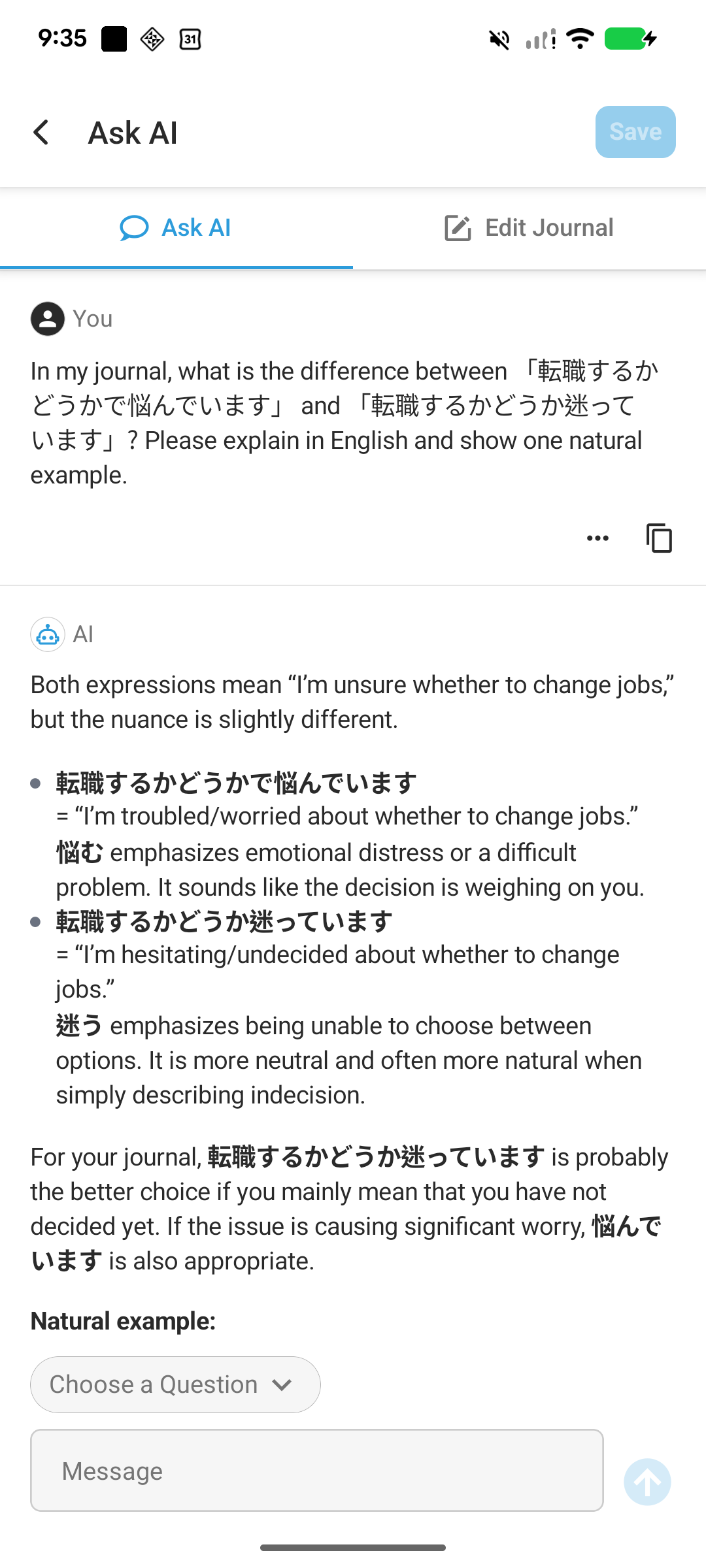
This is useful when you understand a correction but still want to know which expression best matches what you meant.
Practice a correction in a new sentence
Review Exercise turns a point from your corrections into another writing task. Our journal used 新しいことを挑戦する for “try something new.” The app picked that use of を and gave us a new sentence to write in Japanese: “Next year, I will take on a marathon.”
We deliberately used を again in our answer. The app explained in English why 挑戦する takes に here and showed 来年、マラソンに挑戦します。 as a sample. The prompt, our answer, and the feedback all appeared together.
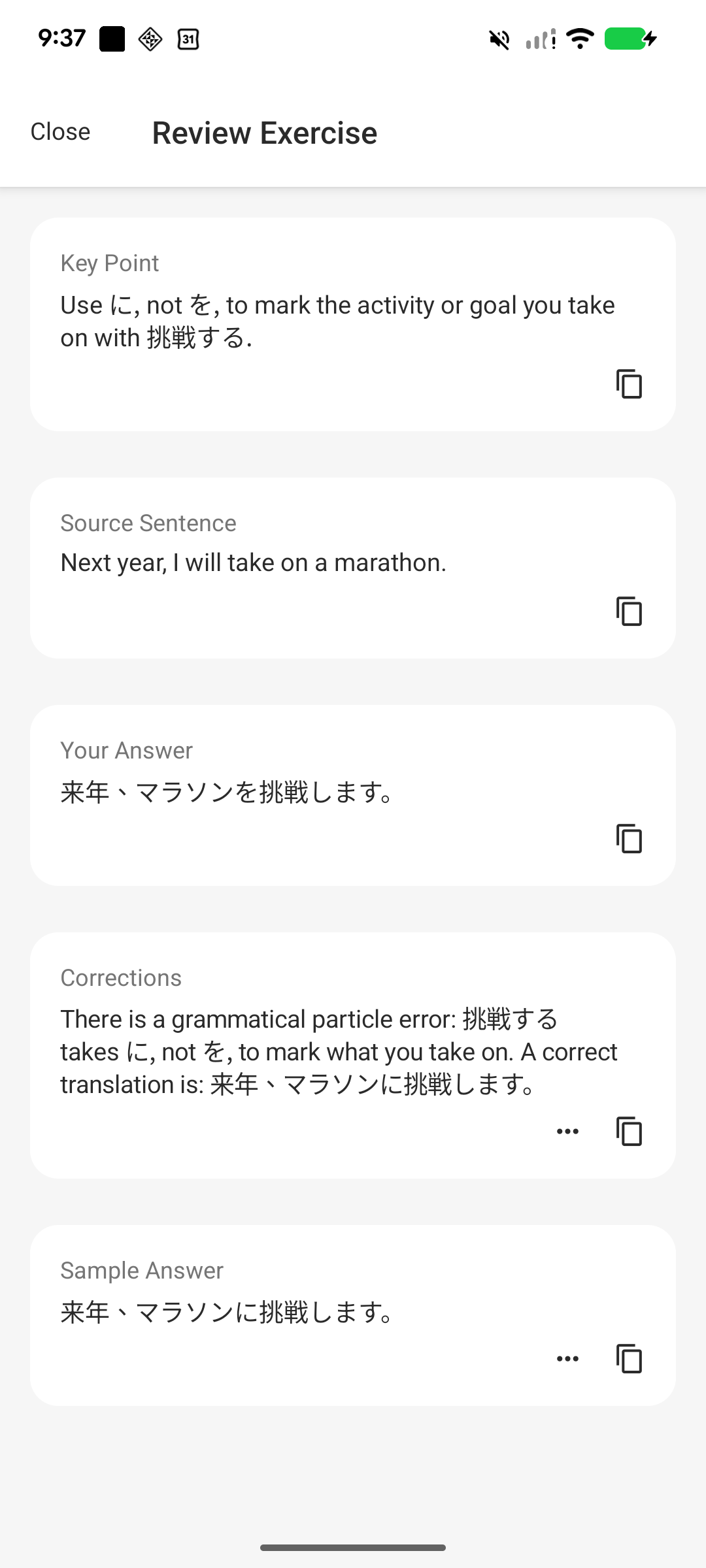
Rather than only rereading a correction, you can try using the same point in a different situation.
Tap a highlighted phrase to see its correction
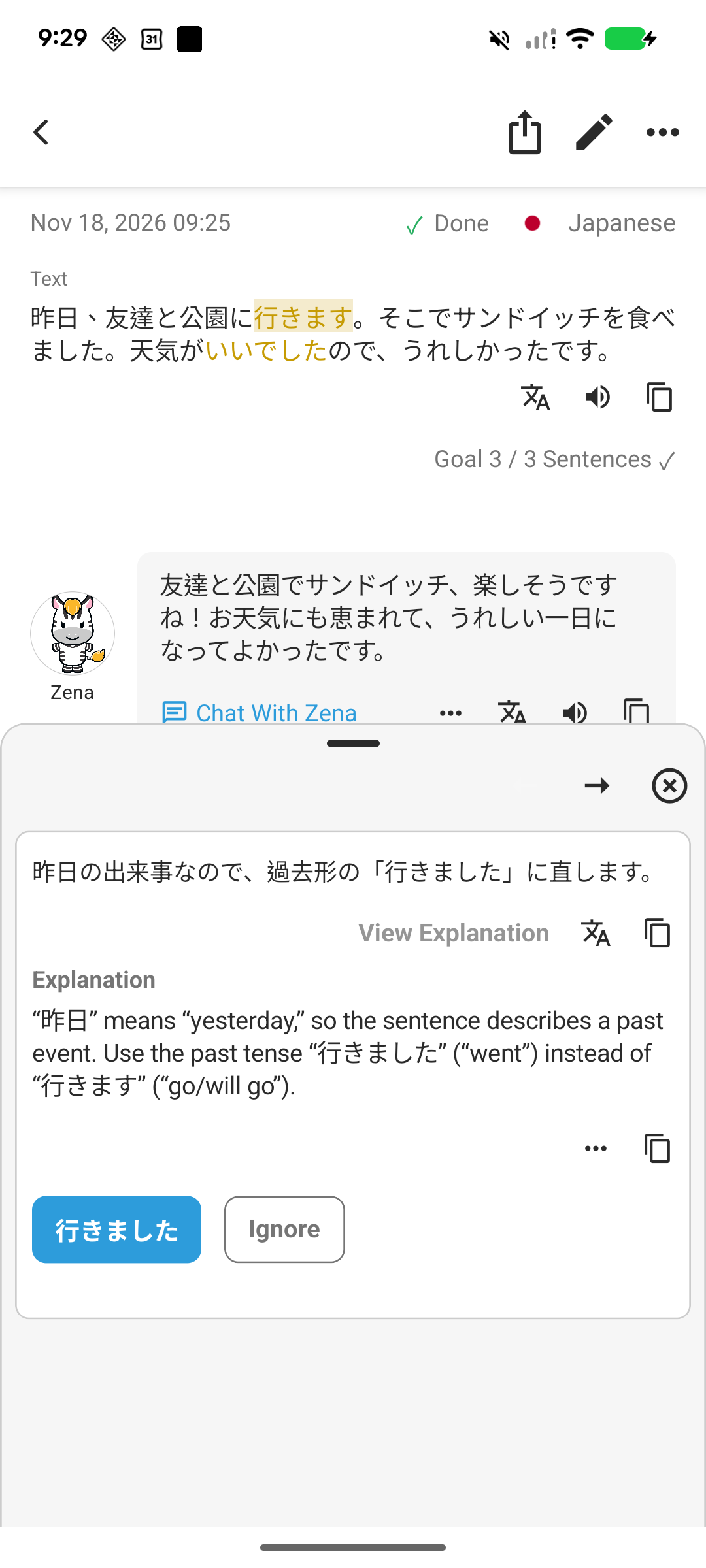
In the short entry about a park visit, the app highlighted 行きます. Tapping it opened a card suggesting 行きました. The card gave a short note in Japanese, and View Explanation told us in English that 昨日 (“yesterday”) calls for the past tense.
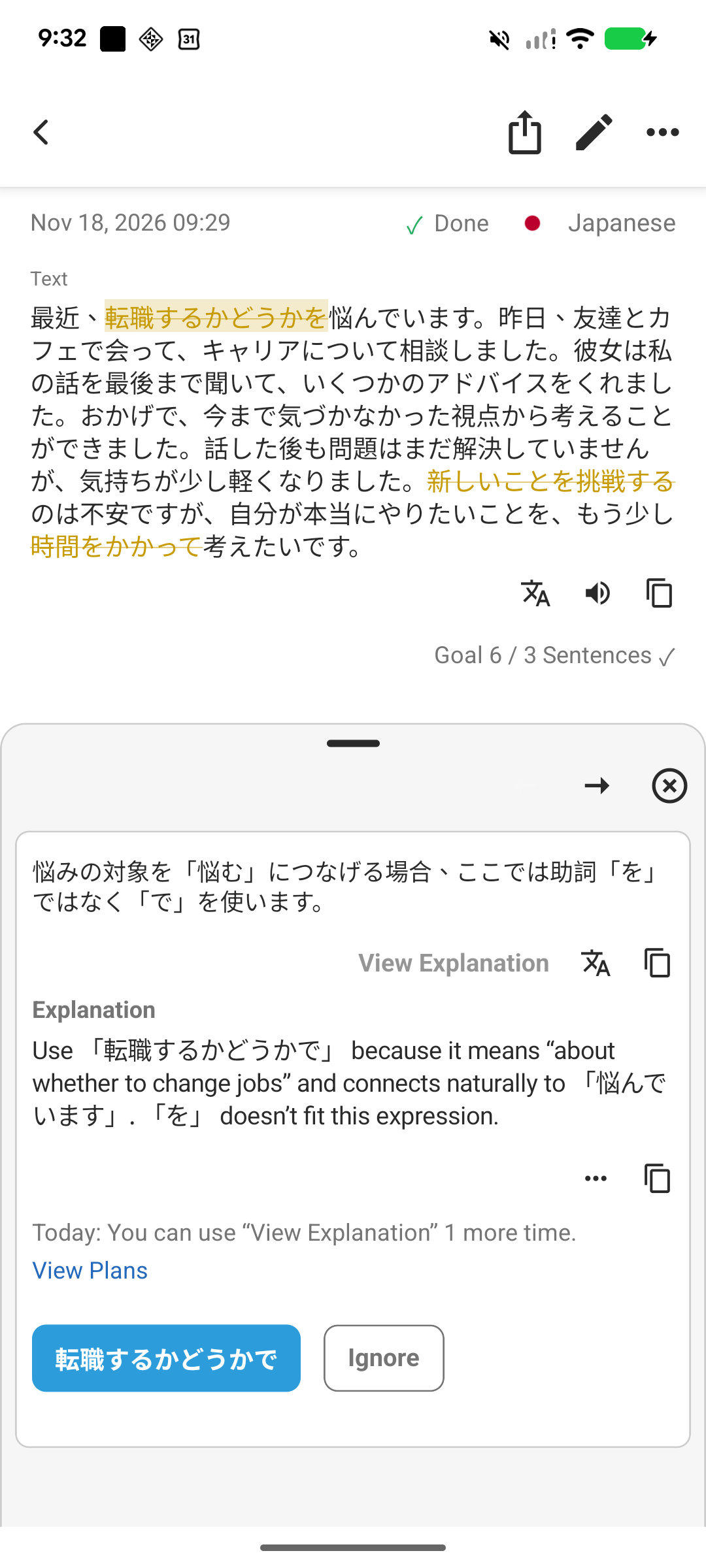
In the longer entry, the app highlighted 転職するかどうかを and suggested 転職するかどうかで before 悩んでいます. The exact spot stayed highlighted in the original journal, so we could read the explanation and then continue from where we left off.
Two features make it easier to keep a language journal over time.
- See how your practice adds up. The Study Log keeps entries by date, so you can reopen an entry and revisit its corrections and questions. Insights shows how many days you’ve studied and how many entries you’ve written. You can also open your weekly reports there when they’re available.
- Give yourself a small daily goal. You can set a target such as three sentences a day and see which days you reached it on the calendar. That gives you a manageable amount to write, even on a busy day.
LangJournal is a good fit if you want journaling to be your main way of learning a language and want each entry to give you something to review and practice later.
2. Blossom

Blossom adds daily missions, XP, and streak rewards to language journaling. You can keep an entry private or share it with other learners.
Free and paid: We used corrections and private saving for free. Premium includes ad removal and unlimited private entries.
Finish a small task and see your progress
After we saved a Japanese entry privately, Blossom showed a streak animation and awarded 50 XP for a Daily Mission. Its progress screen showed the day's completion percentage and total XP.

The streak screen also showed an app icon that unlocks after seven days. It was still locked in our test. A short goal like this gives you something to work toward alongside writing the next entry.
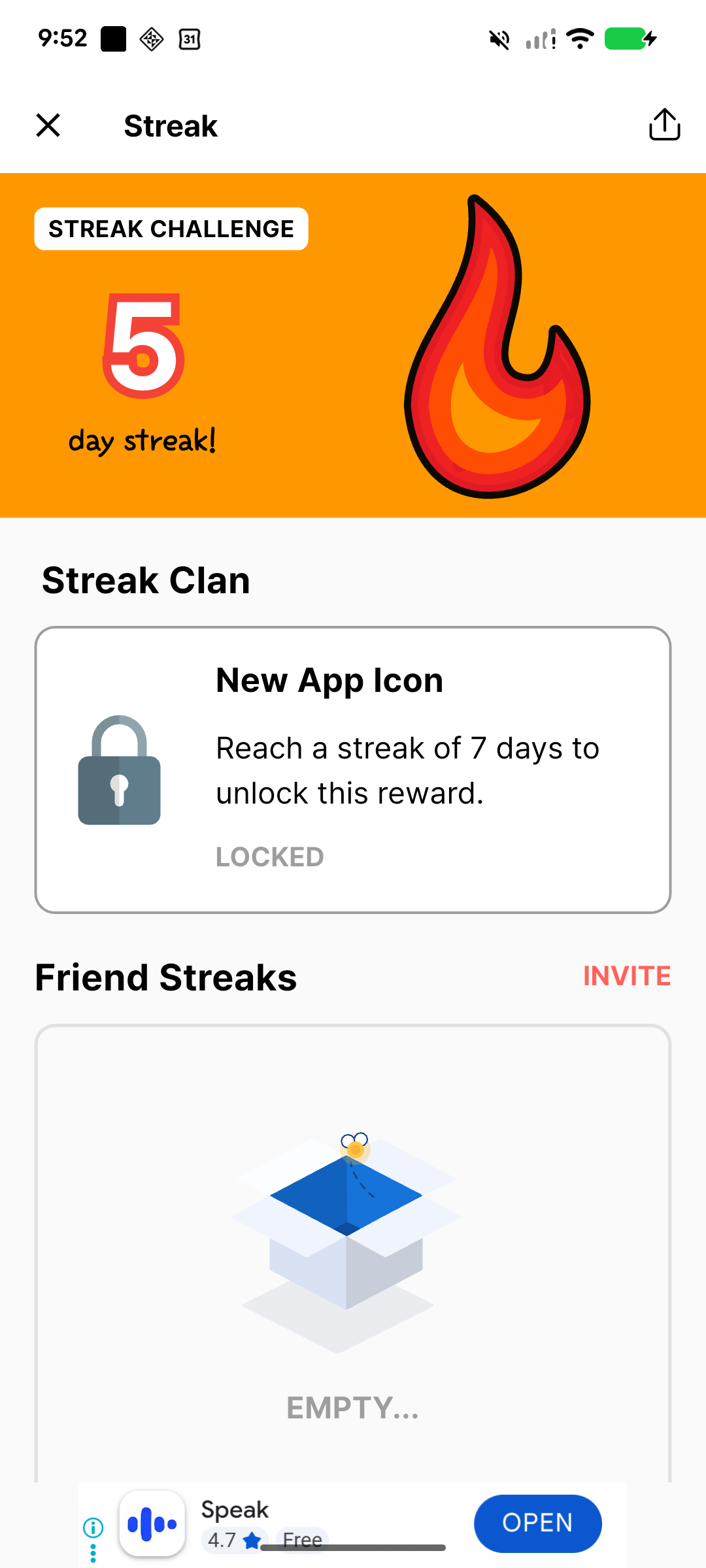
The displayed streak includes earlier practice entries and entries saved for past dates; it does not represent five consecutive days of this Japanese-learning test.
Choose whether to share an entry
Before saving, you can choose Shared Diary or Private. The same dialog shows your native and learning languages. We confirmed English and Japanese, then selected Private for both entries.
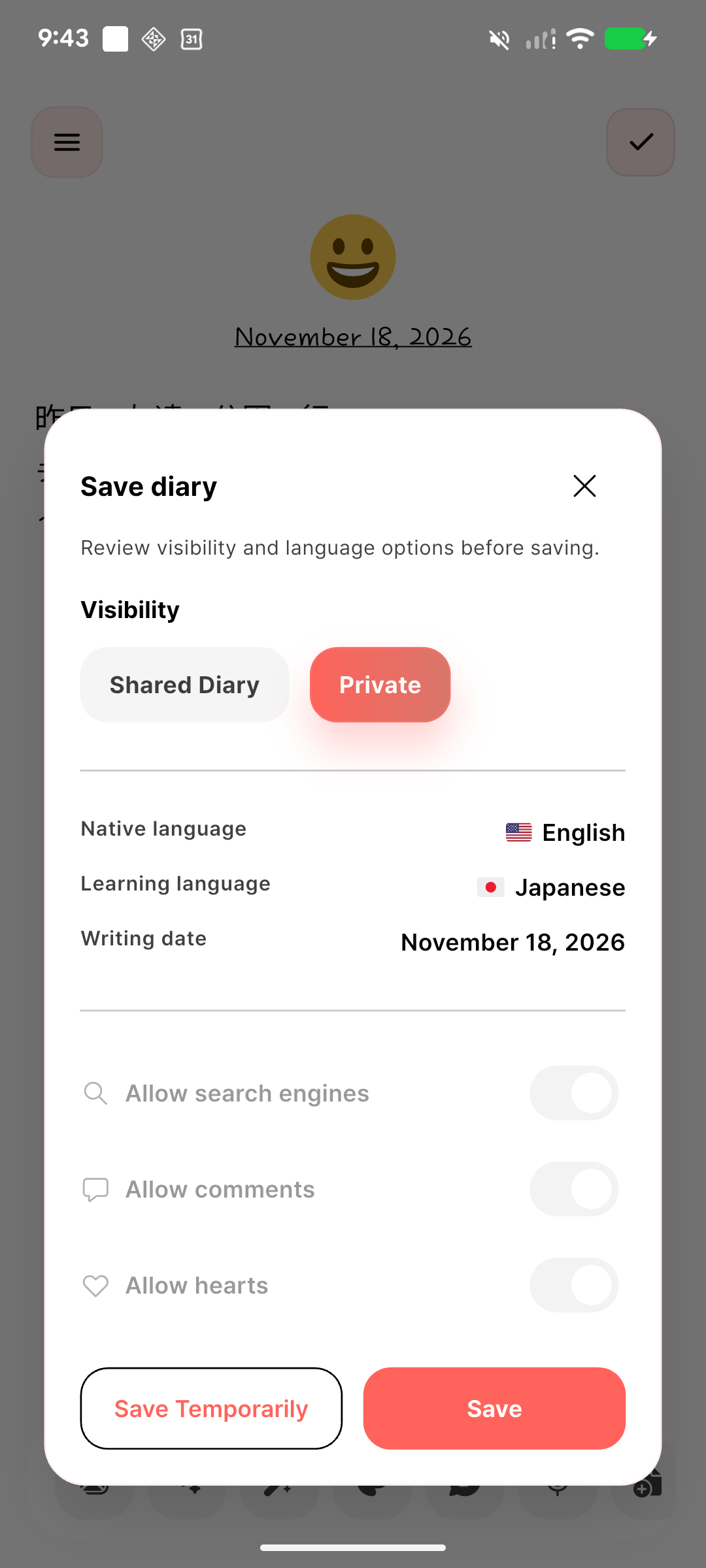
You can use Blossom as a personal journal and share selected entries when you want to. Check the visibility choice each time you save: our new entries initially offered Shared Diary.
Review suggestions one sentence at a time
AI Correction displayed each sentence with its changes and an English translation below it. Accept and Ignore let us choose which suggestions to use; Apply all accepted the set.
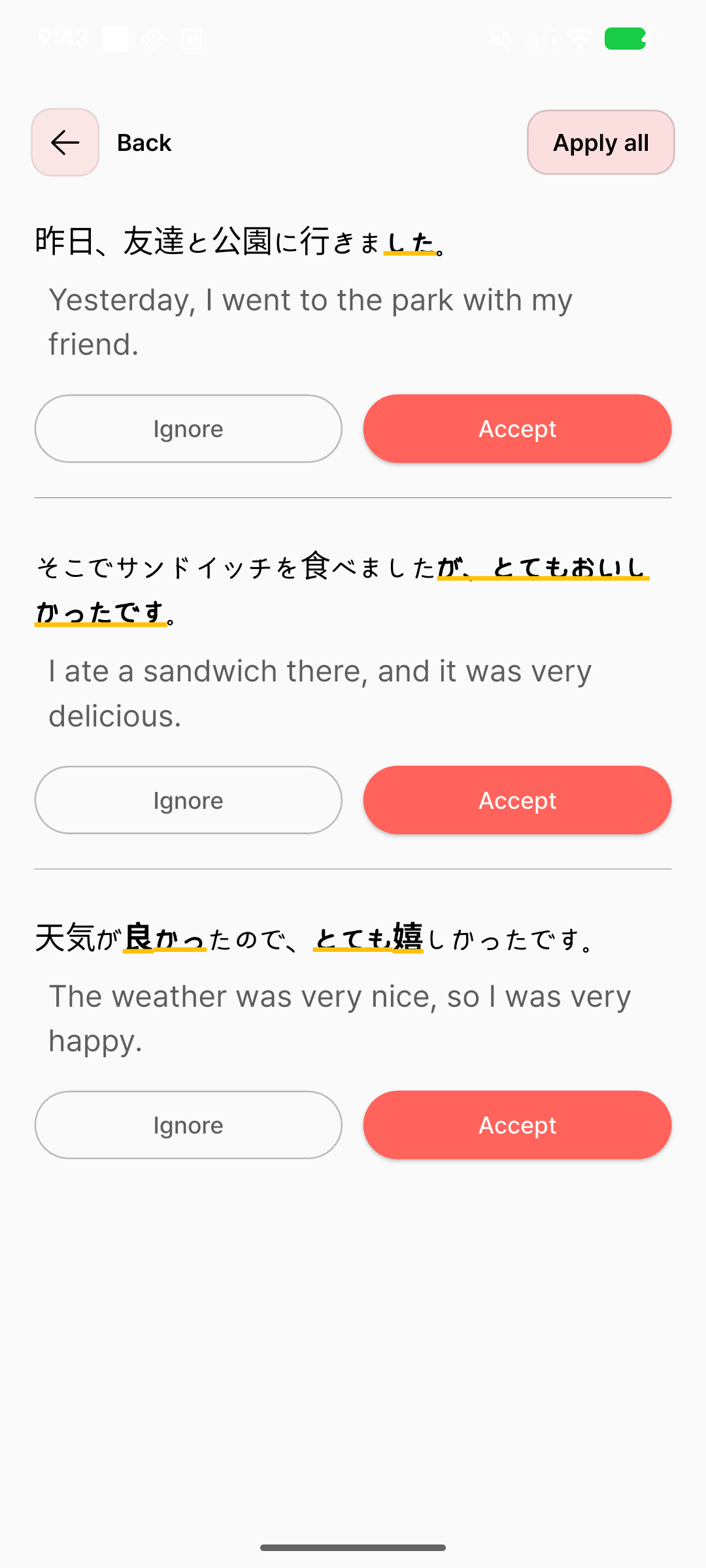
The short entry shows why those controls matter. Blossom changed 行きます to 行きました, and it also expanded そこでサンドイッチを食べました。 (“I ate a sandwich there”) to say that it was very delicious. If all you meant was that you ate a sandwich, you could keep the past-tense fix and skip the added detail.
The longer entry used the same layout, with more cards to scroll through. For example, Blossom suggested キャリアについて話し合いました for キャリアについて相談しました. The English line under each card translates the suggestion. You can use it to check what the new sentence means before you apply it.
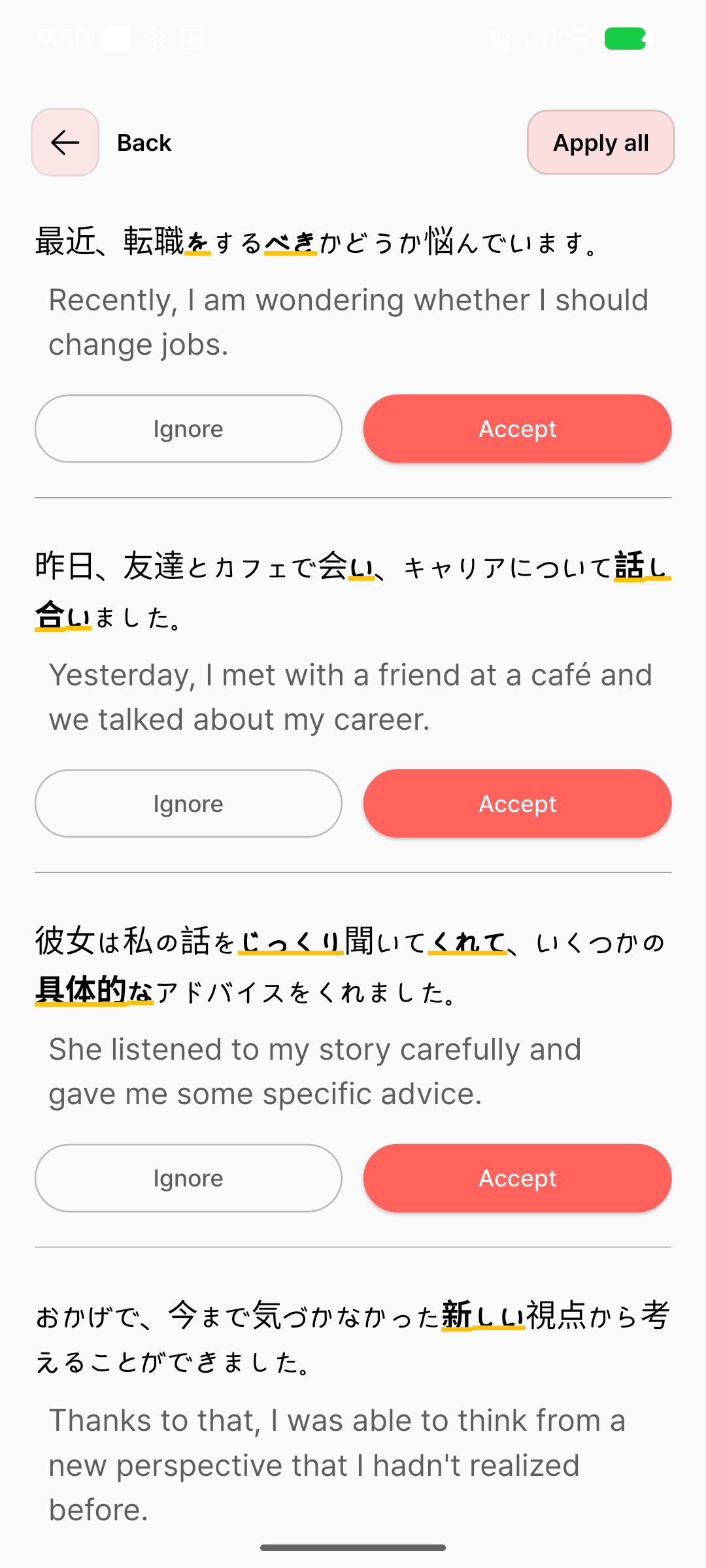
Blossom is a good fit if small goals and rewards make you want to write another entry, with the option to share your diary too.
3. ChatGPT

ChatGPT is a convenient option if you already use it and want flexible feedback on your writing. You can ask for corrections, then keep discussing a phrase in the same chat.
Free and paid: Free accounts can ask for corrections and explanations. Plus ($20/month on the web) offers higher usage limits.
Choose how the feedback is presented
Along with each Japanese entry, we asked ChatGPT to preserve the meaning, show the corrected Japanese, and explain up to three important changes in English.
The short entry came back as a complete, corrected journal entry. Below it, ChatGPT explained changes such as 行きます → 行きました. In the longer entry, it changed 時間をかかって考えたい to 時間をかけて考えたい. Its English explanation pointed out a useful distinction: 時間がかかる means something takes time, while 時間をかける means you spend time on it.
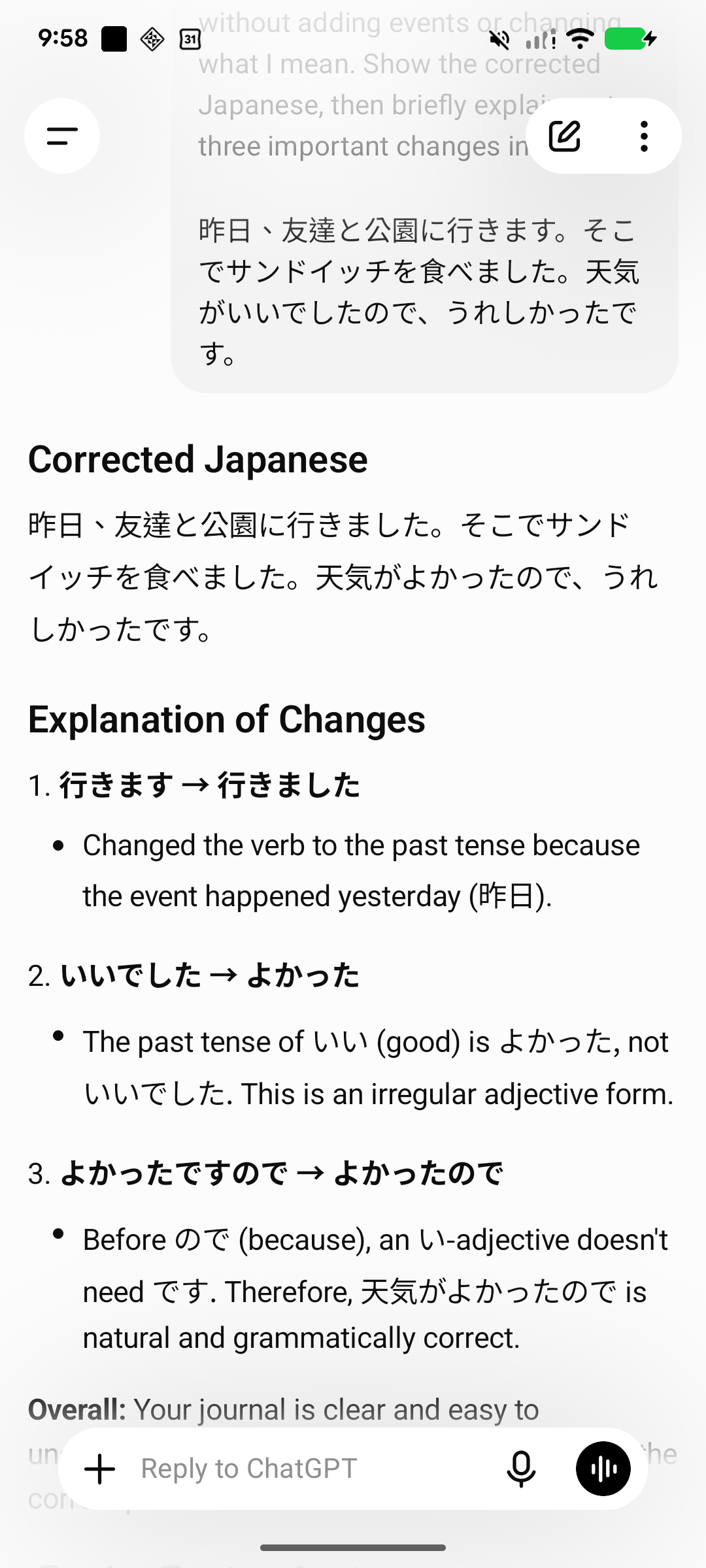
In the short entry, one explanation cited よかったですので as the original wording. The entry actually said いいでしたので. If a correction is hard to follow, ask ChatGPT to quote the exact wording from your entry next to the suggested change.
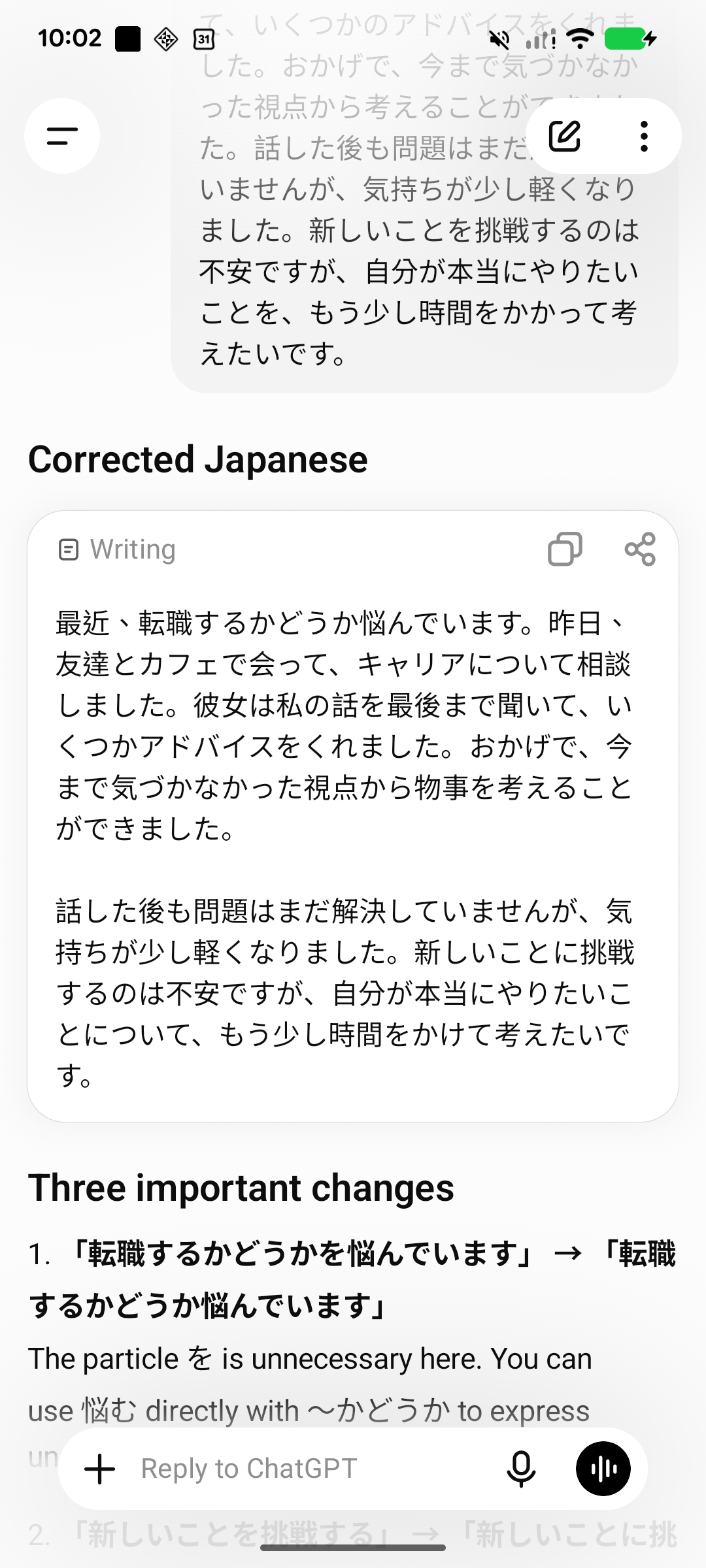
You can adapt the request to how you want to study: ask for only the most important changes, a simpler explanation, or a version that keeps your original wording as much as possible.
Keep discussing what you meant
We asked the same question about 悩む and 迷う that we asked in LangJournal. ChatGPT noticed that the entry described both anxiety about trying something new and feeling lighter after talking to a friend. It recommended 転職するかどうか悩んでいます because the decision was weighing on the writer. Those details make it easier to see why the suggested wording fits the feeling we wanted to convey.
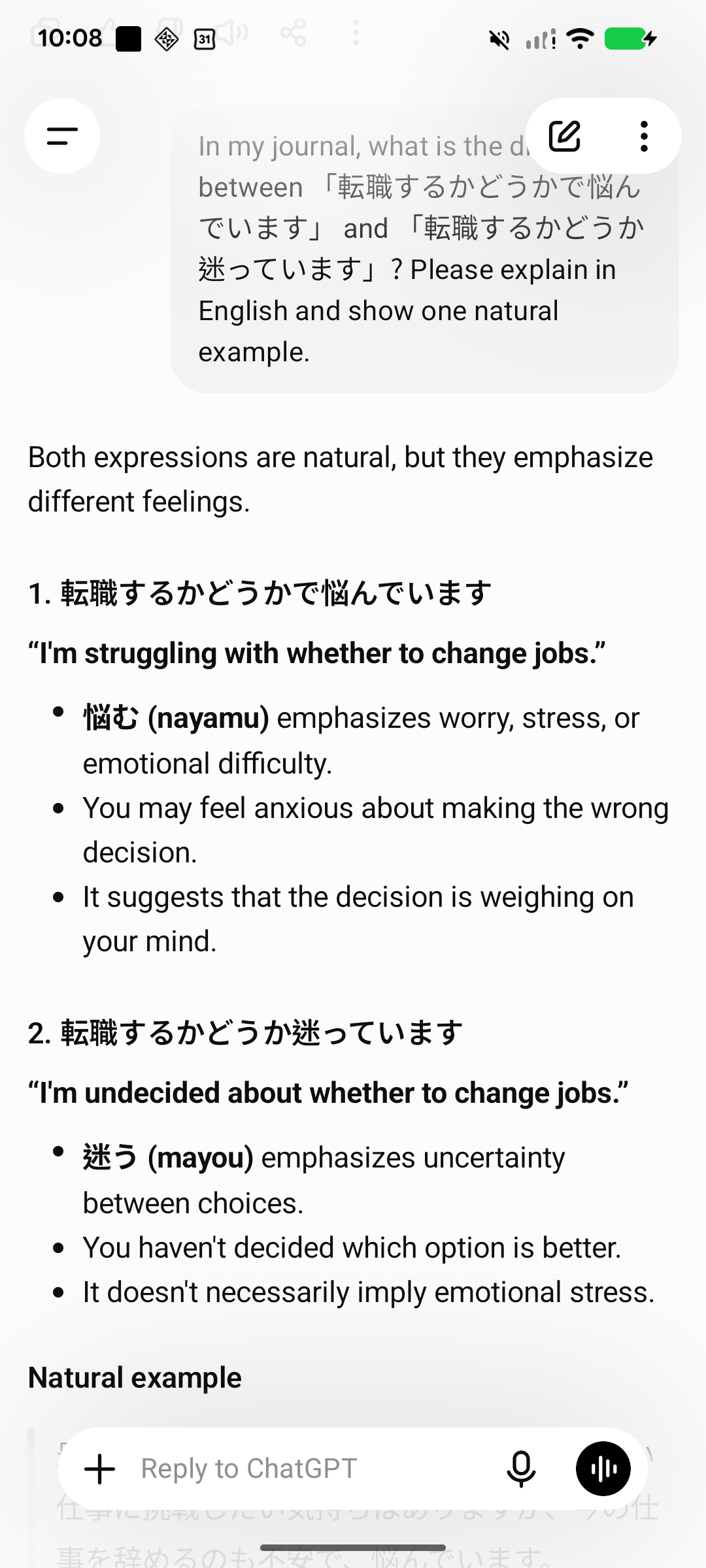
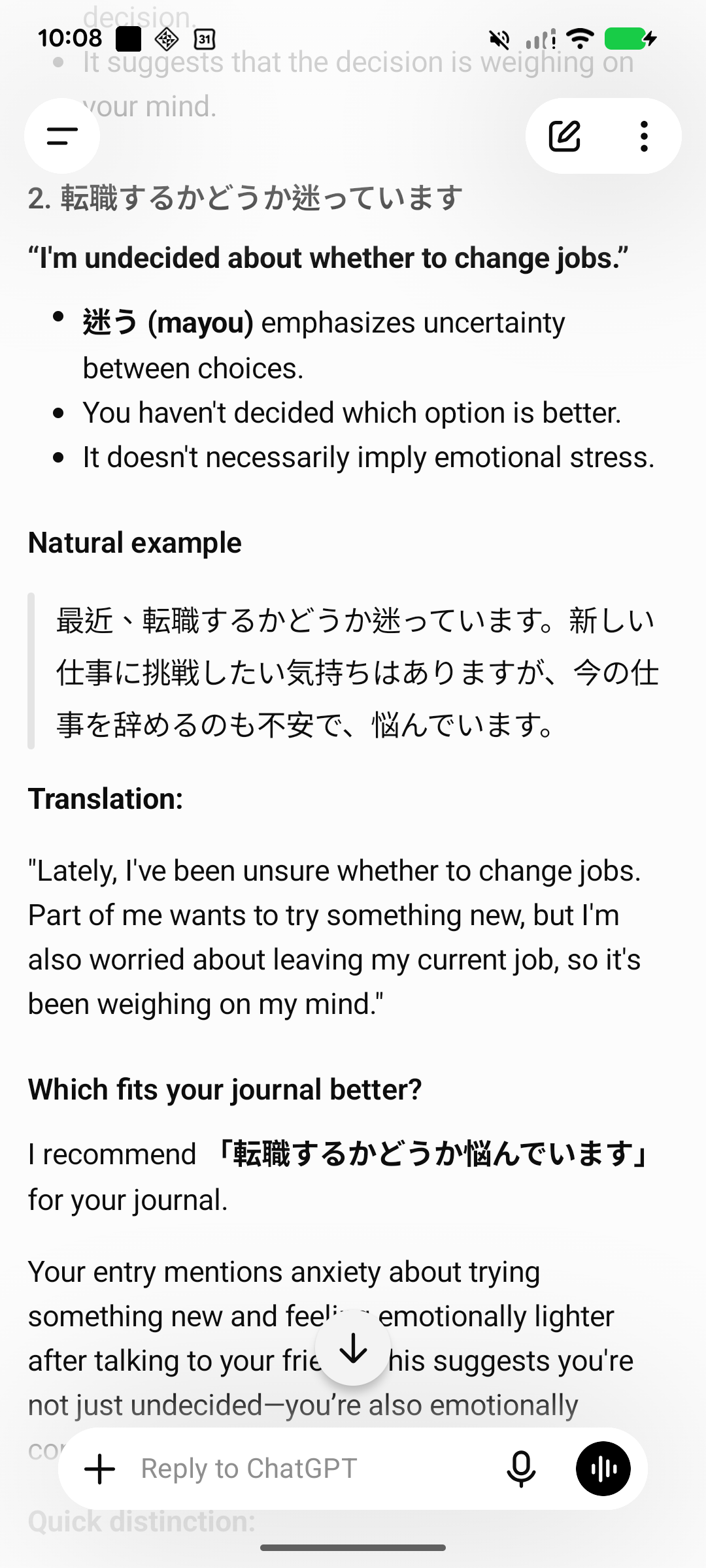
That back-and-forth is useful when a sentence is grammatically possible but you want to express a particular feeling. You can explain more about your intention and ask the next question from there.
Use one chat per entry to make it easier to find
For later review, a useful approach is to keep one entry and its questions in a single chat, then give it a title with the date and topic, such as 2026-11-18 Career plans in Japanese.
If you're already paying for ChatGPT, this is a way to add journal practice to a service you already use. It suits people who want to choose their own prompts and explore questions as they come up.
4. HelloTalk

HelloTalk is a language-exchange app for people who want to use a language with others. A short journal entry can give you a starting point for a conversation, and other users can offer corrections.
Free and paid: Posting and exchanging messages are available for free. VIP ($12.99/month on the U.S. App Store) adds more translation and partner search options.
Share a few lines to start an exchange
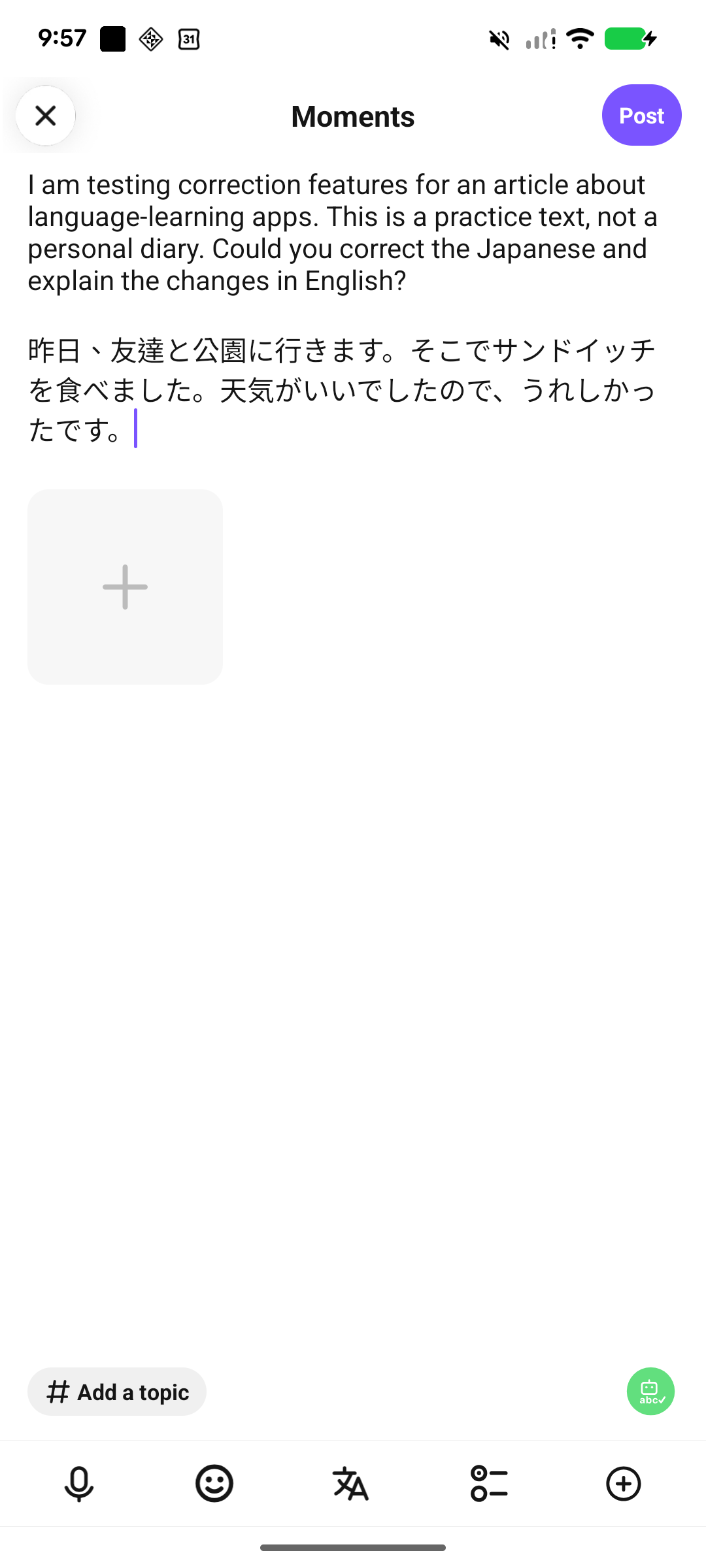
You can write an entry in Moments and ask other users to help with your wording. We shared the short Japanese practice entry from an existing profile set to Japanese as its native language and English as its learning language. In the post, we said it was a sample for this article and asked for explanations in English.
See what someone changed
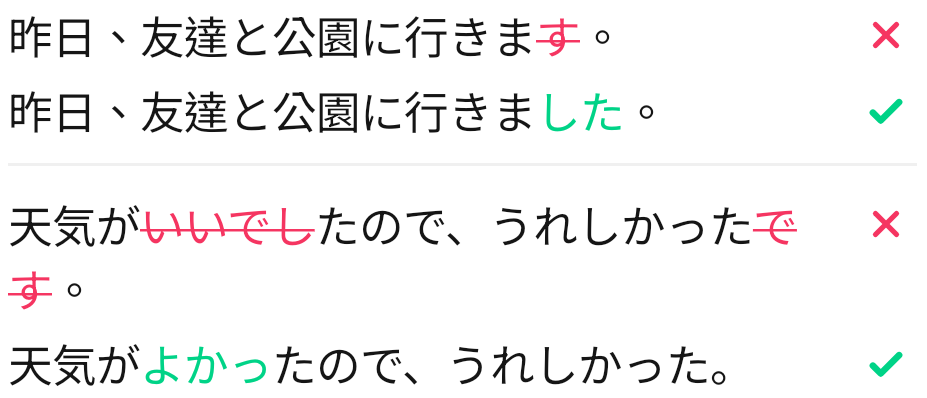
One reader used HelloTalk’s correction tool, which showed each original sentence above the revision in the comments. Removed text was crossed out in red, and added text appeared in green. 昨日、友達と公園に行きます。 became 昨日、友達と公園に行きました。 The reader also suggested 天気がよかったので、うれしかった。 for the sentence about the weather and left a short comment in English about changing the sentences to the past tense. You can see exactly which part the reader is responding to and ask a question under the same post.
Make conversation part of the practice
To make the post easier to respond to, you could add one question about the topic. For this entry, you might ask, “What do you usually bring to a picnic?” You can also follow up on a correction by asking whether the new phrasing sounds casual or polite. Either question gives you a specific place to take the conversation next.
Find someone to practice with
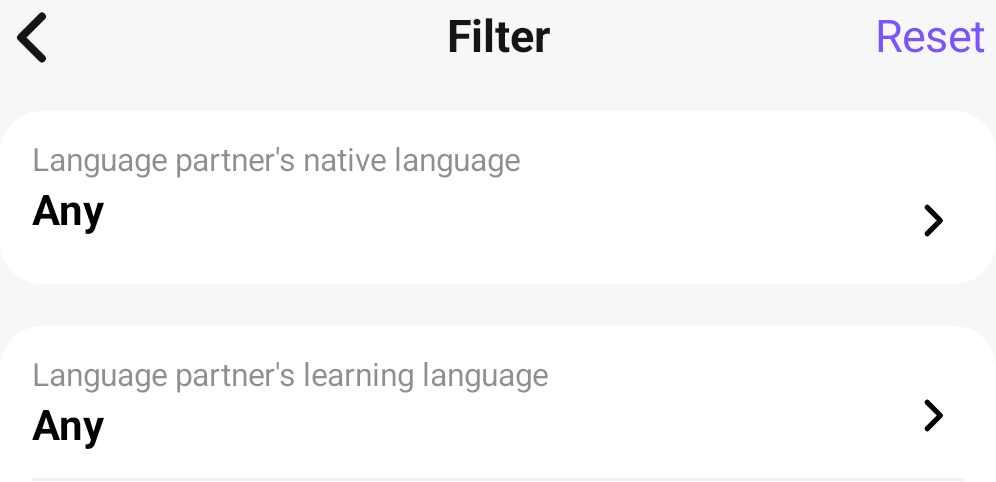
Open Connect and tap the filter icon in Find Partners. The app shows separate fields for a partner’s native language and the language they’re learning. In our test, choosing Japanese as the partner’s native language opened an upgrade screen. That language filter required VIP on the account we used.
You can also use Moments to start an exchange around a topic you both enjoy. If someone writes about a place you know, a question about that place can be an easy way to start a conversation.
It is a good fit if your main motivation is connecting with people and exchanging help in each other's languages. Corrections depend on other users choosing to respond, so allow time for the conversation to develop.
5. JapanesePod101

JapanesePod101 pairs its Japanese courses with a personal teacher through My Teacher in the Innovative Language Learning app. You can send your writing and ask for feedback whenever you have something to share.
The same app has courses for other languages, including SpanishPod101 and EnglishClass101. Premium PLUS is sold separately for each language. Supported languages and subscriptions
Free and paid: Some lessons are free. My Teacher is included in Premium PLUS ($47 for one month at the regular web price). We paid $21.15 for the first month during a promotion.
Send a journal entry to your teacher
We opened My Teacher on Android and found a chat with an assigned teacher. The welcome message suggested practicing a self-introduction, and we could also send our own writing from the same chat. We sent both Japanese practice entries in one message and asked for the main changes to be explained in English. The entries appeared in the conversation immediately, without having to book a lesson.
JapanesePod101 says its teachers aim to reply within one business day. They focus on where your writing can improve, so the extent of the feedback can vary. My Teacher help
See what the teacher corrected in chat
The teacher replied with both entries in one message and marked four changes directly in the text. In the park entry, 行きます became 行きました, with a short note that said “Past.” The teacher also changed いいでした to よかった in the sentence about the weather.
In the longer entry, 新しいことを挑戦する became 新しいことに挑戦する, and 時間をかかって became 時間をかけて. A separate message gave a new example, ロッククライミングに挑戦しました。 (“I tried rock climbing”), and repeated 時間をかける on its own. This made it possible to reuse the pattern beyond the original diary entry.
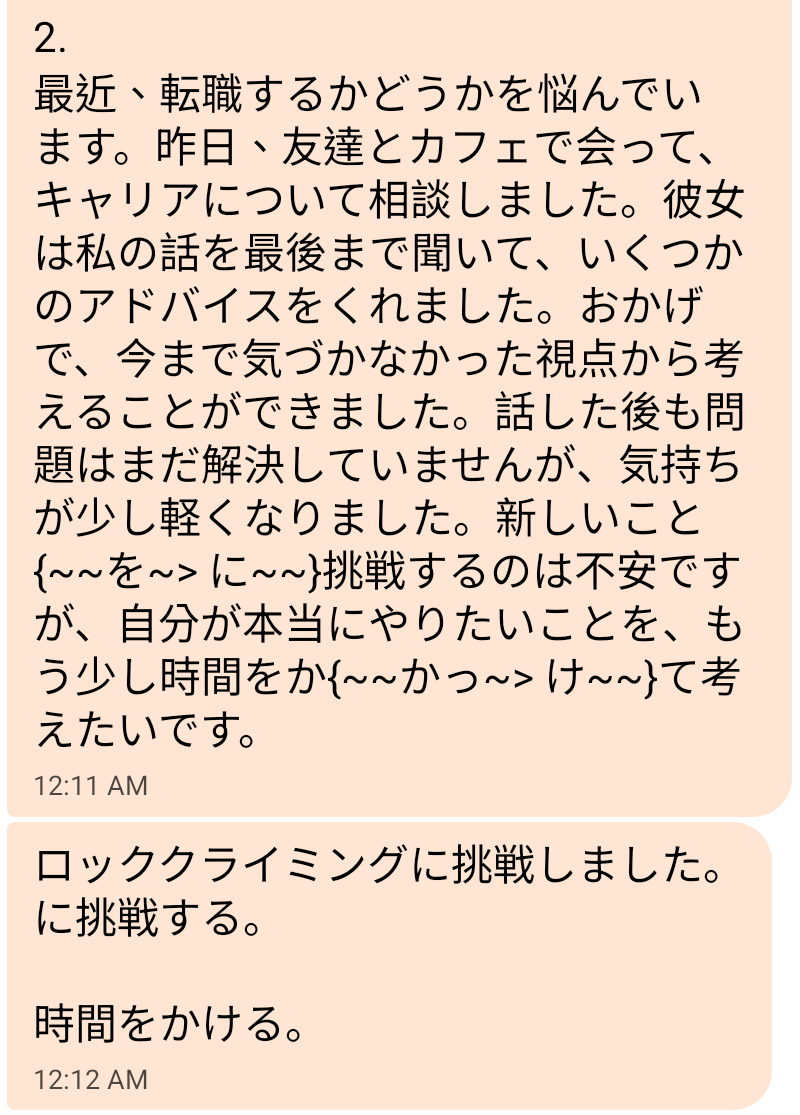
In our Android test, the edits appeared as symbols inside the message. The example was easier to read in its own bubble. We asked for explanations in English and received the brief “Past” note along with the Japanese examples. A follow-up about one specific change would be a good next step if you want a fuller explanation.
JapanesePod101 is worth considering if you want to send your Japanese writing to an assigned teacher and ask questions in the same private chat. Keep the $47 monthly price in mind if you mainly want detailed explanations of every correction.
Start with a short journal entry
Write two or three sentences about something that happened yesterday and how you felt about it. You can try a free correction in LangJournal, Blossom, or ChatGPT. On HelloTalk, you can post in Moments and invite other learners to respond. If you want private feedback from an assigned Japanese teacher, My Teacher requires JapanesePod101’s paid Premium PLUS plan.
When you get feedback, pick one change worth remembering. If you can ask a question, try “Why did you change this phrase?” Then see if you can use what you learned in your next entry.
For feedback on other kinds of writing, see our comparison of multilingual writing correction services.